2025-12-07

AMD Radeon Instinct MI50-32GB: best AI card for beginners ?

I recently stumbled upon this llama.cpp fork which supports AMD Radeon Instinct MI50-32GB cards ("gfx906"). That made me discover this card, and notice that some of them were amazingly cheap, around $250 used. The 16GB variant is even cheaper, around $100. I had long been watching AI-capable hardware for quite a long time, thinking about various devices (Mac Ultra, AMD's AI-Max-395+, DGX Spark etc), knowing that memory size and bandwidth are always the two limiting factors: either you're using a discrete GPU and have little RAM but a large bandwidth (suitable for text generation but little context), or you're using a shared memory system like those above, and you have a lot of RAM with a much lower bandwidth (more suitable for prompt processing and large contexts). And this suddenly made me realize that this board with 32 GB and 1024 GB/s bandwidth would have the two at once.

I checked on Aliexpress, and cheap devices were everywhere, all with a very high shipping cost though. I found a few on eBay in Europe with decent prices. I bought one to give it a try. I was initially cautious because these cards require a forced air flow which might be complicated to set up, and can be extremely noisy, resulting in the card never being used. Some assemblies were seen with 4cm high-speed fans.

When I received the card, I disassembled it to find that it had a dedicated room for a 75mm fan in it as can be seen below:

I didn't know however if it would be sufficient to cool it, so I installed a temporary CPU fan on it, filling holes with foam:


Then I installed ubuntu-24.04 on an SSD, the amdgpu drivers, rocm stack and built llama.cpp and it initially didn't work. All machines on which I tested it failed to boot, crashed etc. I figured that I needed to have "Above 4G decoding" enabled in the BIOS... except that all my test machines don't have it. I had to buy a new motherboard (which I'll use to upgrade my PC) to test the card.

And there it worked fine, keeping the GPU around 80 degrees C. The card is quite fast thanks to its bandwidth. On Llama-7B-Q4_0, it processes about 1200-1300 tokens/s and generates around 100-110 token/s (without/with flash attention). That's about 23% of the processing speed of a RTX3090-24GB and 68% of the generation speed, for 33% more RAM and 15% of the price!

It was time to try to cut the cover. I designed a cut path using Inkscape and marked it using my laser engraver in order to cut it with my dremel. It's not very difficult, it's just an approximately 0.5mm thick aluminum cover, so it takes around 2 cutting discs and 15mn to cut all this:


Installed the fan, here a Delta 12V 0.24A:


It was also necessary to plug the holes on the back. We're seeing some boards sold with a shroud to hold a loud fan that brings the air from the back because it's wide open. I just cut some foam to the same shape as the back, and after a few attempts it worked pretty fine:


Software testing

Even moderately large models such as Qwen3-30B-A3B-Instruct-2507-Q5_K_L.gguf (MoE) or Qwen3-VL-32B-Instruct in Q4_K_M and Q4_0 quantizations (Q4_0 is quite fast here):

| model                          |      size |  params | backend | ngl | n_batch | n_ubatch | fa |  test |           t/s |
| ------------------------------ | --------: | ------: | ------- | --: | ------: | -------: | -: | ----: | ------------: |
| qwen3moe 30B.A3B Q5_K - Medium | 20.42 GiB | 30.53 B | ROCm    |  99 |    1024 |     2048 |  1 | pp512 | 587.85 ± 0.00 |
| qwen3moe 30B.A3B Q5_K - Medium | 20.42 GiB | 30.53 B | ROCm    |  99 |    1024 |     2048 |  1 | tg128 |  75.65 ± 0.00 |
| qwen3vl 32B Q4_K - Medium      | 18.40 GiB | 32.76 B | ROCm    |  99 |    1024 |     2048 |  1 | pp512 | 216.40 ± 0.00 |
| qwen3vl 32B Q4_K - Medium      | 18.40 GiB | 32.76 B | ROCm    |  99 |    1024 |     2048 |  1 | tg128 |  19.78 ± 0.00 |
| qwen3vl 32B Q4_0               | 17.41 GiB | 32.76 B | ROCm    |  99 |    1024 |     2048 |  1 | pp512 | 278.20 ± 0.00 |
| qwen3vl 32B Q4_0               | 17.41 GiB | 32.76 B | ROCm    |  99 |    1024 |     2048 |  1 | tg128 |  24.50 ± 0.00 |

build: 4206a600 (6905)
I connected the fan to a FAN connector on the motherboard, and adjusted the PWM  to slow it down enough to keep it mostly silent. Around 35-40% speed, the noise is bearable and the temperature stabilizes to 100-104 degrees C while processing large inputs. It's also interesting to see that as soon as the boards switches to generation, it's limited by the RAM bandwidth so GPU cores slow down to a lower frequency and the card starts to cool again.

I noticed that support for this chip was recently merged into the mainline llama.cpp. I tried it, it often shows the same performance except for smaller quantizations like Q4_0 which is a bit slower (~7% on PP, up to 20% on small models like 7B):

| model                          |      size |  params | backend | ngl | n_batch | n_ubatch | fa |  test |           t/s |
| ------------------------------ | --------: | ------: | ------- | --: | ------: | -------: | -: | ----: | ------------: |
| qwen3moe 30B.A3B Q5_K - Medium | 20.42 GiB | 30.53 B | ROCm    |  99 |    1024 |     2048 |  1 | pp512 | 590.24 ± 0.00 |
| qwen3moe 30B.A3B Q5_K - Medium | 20.42 GiB | 30.53 B | ROCm    |  99 |    1024 |     2048 |  1 | tg128 |  76.70 ± 0.00 |
| qwen3vl 32B Q4_K - Medium      | 18.40 GiB | 32.76 B | ROCm    |  99 |    1024 |     2048 |  1 | pp512 | 229.45 ± 0.00 |
| qwen3vl 32B Q4_K - Medium      | 18.40 GiB | 32.76 B | ROCm    |  99 |    1024 |     2048 |  1 | tg128 |  19.86 ± 0.00 |
| qwen3vl 32B Q4_0               | 17.41 GiB | 32.76 B | ROCm    |  99 |    1024 |     2048 |  1 | pp512 | 259.87 ± 0.00 |
| qwen3vl 32B Q4_0               | 17.41 GiB | 32.76 B | ROCm    |  99 |    1024 |     2048 |  1 | tg128 |  24.99 ± 0.00 |

build: db9783738 (7310)

Scaling to two cards

I was convinced and wanted at least another one to see how multiple cards work together. Things began to become quite difficult because apparently the rumor had spread about this card, and prices went crazy, with most being between 380 and 450 EUR, and some even at 1700. I searched for one week, even tried to negotiate with some vendors with no acceptable deal in sight, while prices were still rising. And luckily my vendor recontacted me indicating they had one returned, and they sent it to me at the original price. So I'm now having 7680 cores and 64 GB RAM for 500 EUR shipping included! The only way to beat this is by using the 16GB variant instead but one needs lots of PCIe slots in this case.


I've tried different fans on the new card: 0.45A, 0.55A, 0.70A, and the 0.45A one is quite sufficient and really effective. I should even replace the previous one in the first card with a similar one. Now my two fans spin at around 1500-1600 RPM:
$ cat /sys/class/hwmon/hwmon8/fan{6,7}_input
1536
1480
And the rocm-smi utility shows that both cards are doing well:
$ rocm-smi

=========================================== ROCm System Management Interface ===========================================
===================================================== Concise Info =====================================================
Device  Node  IDs              Temp    Power     Partitions          SCLK    MCLK    Fan     Perf  PwrCap  VRAM%  GPU%  
              (DID,     GUID)  (Edge)  (Socket)  (Mem, Compute, ID)                                                     
========================================================================================================================
0       1     0x66a1,   29631  38.0°C  20.0W     N/A, N/A, 0         930Mhz  350Mhz  14.51%  auto  225.0W  0%     0%    
1       2     0x66a1,   8862   34.0°C  17.0W     N/A, N/A, 0         930Mhz  350Mhz  14.51%  auto  225.0W  0%     0%    
========================================================================================================================
================================================= End of ROCm SMI Log ==================================================
I was initially surprised to see absolutely no change on llama-bench, but found a thread where it was explained that this is normal because llama-bench doesn't use large inputs and it's only on large inputs that the cards can work in parallel (in which case the prompt processing almost doubles but text generation doesn't change). It could allow two users to run in parallel on the llama-server with a higher speed though, but I don't really need this. The real gain for me here is the larger context combined with the ability to load large models. And of course, it's still appreciated to almost double the performance when consuming large prompts.

Another point which is appreciable is when uploading images to be analyzed, because they're processed in parallel by the cards. It was even possible to load Qwen3-235B quantized in TQ1 (1.5625bit):
| model                                   |       size |     params | backend    | ngl | n_batch | n_ubatch | fa | mmap |  test |           t/s |
| --------------------------------------- | ---------: | ---------: | ---------- | --: | ------: | -------: | -: | ---: | ----: | ------------: |
| qwen3vlmoe 235B.A22B IQ1_S - 1.5625 bpw |  50.67 GiB |   235.09 B | ROCm       |  99 |    1024 |     2048 |  1 |    0 | pp512 | 137.10 ± 0.00 |
| qwen3vlmoe 235B.A22B IQ1_S - 1.5625 bpw |  50.67 GiB |   235.09 B | ROCm       |  99 |    1024 |     2048 |  1 |    0 | tg128 |  19.93 ± 0.00 |
137 tokens/s in and 20 token/s out for a 50GB model is quite good (that's due to the MoE architecture, there are in fact 22B active weights at a given moment). I could never do anything with such a large model in the past, even on the Ampere Altra at work since it has only around 5% of this setup's memory bandwidth and processing power. And when dealing with a very large context, a task that took 20 hours on the Altra took one minute here! Now I know for certain that such processing must be done on GPU only.

Power management

I noticed that the boards can automatically control a fan output depending on the temperature and power drawn, but after looking everywhere on the PCB for one hour, I couldn't find any track looking like a PWM output. The fan-like connectors are not connected to anything, and there are empty pads around so it's hard to estimate if it's a pin out of the GPU itself that is supposed to drive the fans, or if it's expected to communicate with an external MCU. Finally I'm connecting the fans to the mainboard and that's fine.

I found that it was possible to reduce the maximum power drawn by the boards. By capping them to 180W, I'm losing around 10% processing capacity, almost no generation capacity, and the cards barely reach 90 degrees C with the fans staying at low speed. For example this is after about 2 minutes of consuming a large input file:

$ rocm-smi -d 0 --setpoweroverdrive 180
$ rocm-smi -d 1 --setpoweroverdrive 180
$ rocm-smi
====================================================== Concise Info ======================================================
Device  Node  IDs              Temp    Power     Partitions          SCLK     MCLK    Fan     Perf  PwrCap  VRAM%  GPU%  
              (DID,     GUID)  (Edge)  (Socket)  (Mem, Compute, ID)                                                      
==========================================================================================================================
0       1     0x66a1,   29631  81.0°C  181.0W    N/A, N/A, 0         1485Mhz  800Mhz  100.0%  auto  180.0W  85%    100%  
1       2     0x66a1,   8862   76.0°C  178.0W    N/A, N/A, 0         1485Mhz  800Mhz  30.2%   auto  180.0W  80%    100%  
==========================================================================================================================
After a long time at full speed it can stabilize:

====================================================== Concise Info ======================================================
Device  Node  IDs              Temp    Power     Partitions          SCLK     MCLK    Fan     Perf  PwrCap  VRAM%  GPU%  
              (DID,     GUID)  (Edge)  (Socket)  (Mem, Compute, ID)                                                      
==========================================================================================================================
0       1     0x66a1,   29631  89.0°C  76.0W     N/A, N/A, 0         930Mhz   350Mhz  100.0%  auto  180.0W  59%    100%  
1       2     0x66a1,   8862   86.0°C  152.0W    N/A, N/A, 0         1485Mhz  800Mhz  30.59%  auto  180.0W  59%    100%  
==========================================================================================================================
Photos taken with a thermal camera confirm these measurements and the fact that the first board is slightly hotter than the second one:


I could probably increase the power limit to 200W to regain a few more percent of processing performance, though it's really not important.

By the way it's visible here that the first card is a bit hotter since its fan is a less powerful (I can adjust that using /sys but here it's not really needed). Another interesting observation is that the boards rarely run with everything at full speed. Either it's the GPU that peaks at 1725 MHz, or it's the RAM that peaks at 1000 MHz, but the card's power management is quite effective at adjusting the frequencies very quickly to the needs. It's in fact super hard to observe both SCLK and MCLK at full speed at the same time above. I never managed to see more than 500W on the mains power meter, and even then it's super rare, the most common power drawn is in the range of 270-330W.
 
I've seen that some users successfully overclock their RAM to 1200 MHz and directly gain 20% text generation speed. Given that the RAM doesn't influence heat that much, it's something I could try, though for now I don't even know where to start given that the driver (or maybe the card's firmware?) enforces the limitations. I'm not going to reflash them though :-)

Caveats

If this card is so great, why isn't it used more ? Just because AMD has dropped support for it in latest ROCm 7.x drivers. It still works to install ROCm 7 and copy all the tensile files having "gfx906" in their names from ROCm-6.4.4 into /opt/rocm/ but it might trigger bugs. I'll need to try again with pure ROCm-6.4.4. This means that in the near future, this board it just going to become e-waste thanks to AMD's pressure to force customers to quickly renew their hardware. It's a shame because it's still an extremely valuable device which has the same amount of RAM as a 5090 and more than 4 times its FP64 processing capacity! It's just not optimal for AI anymore despite being pretty decent compared to commonly available consumer products. Thinking that the cheapest equivalent setup made of three 3090-24GB would cost 5000 EUR, or 10x more than mine explains why this card has become so popular! And AMD showing their customers how they can quickly drop support for well-working products is not something that will convince them to buy their products in the future. At least they won't count me among their customers.

Future

I don't think that AMD will roll back on their decision to drop support for these cards, but for now they allow me to experiment a lot with much larger models than before and with super large contexts that were not practical on CPU only, in order to try to qualify HAProxy patches for backports, see if it's reasonably feasible to spot certain classes of bugs in recent commits, and also help synthetize commit messages to give me summaries of some changes I missed, which helps a lot to prepare the announces for new versions. For the time it works, it's nice. Once it's no longer possible to use these cards, or if it's conclusive and we want to buy something at work, then we'll likely switch to an nvidia or maybe intel, depending on the amount of RAM needed.

I've also seen some videos where people were generating images in less than one second using these cards. I haven't tried this and don't know the software in use yet, but that's clearly among the interesting things to experiment with.

A long time project I had been having that I initially thought about hosting on my Radxa Orion O6 was analyzing and summarizing incoming e-mails. The problem was that large messages could take one minute to be analyzed and I receive quite more than 1440 mails per day, so it would require me to only process some of them. With these cards I could run the same analysis in a few seconds and experiment better without having to pre-filter anything. And given the silent fans I can easily keep the device running full time.

2025-08-24

Redudant power supply for home servers and devices

A well known story

All those who run a small infrastructure at home know this problem. It's Monday morning, while drinking your first coffee you're checking your e-mails, you find that you received surprisingly few during the night, and that the last one was from 5 hours ago. Then this well-known feeling starts to build up: "what is it this time? FS full, unregistered from all mailing lists at once, missed a domain renewal notification, or a machine died?". At this point you finish drinking your coffee quickly because you know that it will cool down faster than you'll get the problem fixed, and you start to ping various machines and devices while chewing some biscuits, to discover (in any order of preference):

  • a reverse proxy no longer responding
  • many machines no longer responding (likely indicating a switch issue)
  • the router not responding

Then you go to the office/lab/basement/garage/wherever the machines are located, and start debugging in underwear, thinking that it's really not a great moment because you planned to arrive early at work to prepare some stuff before a meeting...

Finally the culprit is almost always the same: a dead power brick whose LED (if any) blinks slowly indicating a dead input capacitor, or not at all anymore:

Then starts the moment of removing the dust from the sticker to find the voltage and amperage, and open all trays to find an almost equivalent one which should hopefully get the job done even if it's half the amperage because you know your devices are not pulling that much... And when you want to connect it, you notice that its connector is a 2.1mm inner while the previous one was a 2.5mm. But by forcing a lot you manage to establish a contact and consider that it will be sufficient for the time it takes to order another power block, then you can go to the shower.

There is a variant to that story: you're working in your office, notice the light flickering, and realize you had a micro power outage on the mains. Most of your small servers didn't notice, but one wasn't that lucky and experienced a brownout. You decide that enough is enough, it's really time to connect all of them to the UPS, but the UPS has too few outputs, all on C13 plugs and you have to modify a pair of power strips to install a C14 connector on them in order to connect all your small devices:

And once that's done, you discover the day your UPS fails to take over a short power cut and want to remove it, that you have no other C13 power strip to which you can connect the C14-equipped strips, something like this that I once had to build exactly because of this:


It's got only marginally better with USB power delivery because when a power brick dies, it's often easier to find another one (but rarely a high power one), or you can sometimes temporarily daisy-chain the device to another device (provided that it was not itself already daisy-chained).

All of this sounds familiar ?

Root cause 

The reason to all these problems is the multiplicity of low-power devices which all come with their own power block, each requiring a distinct mains outlet. And sometimes angled ones cannot even be placed close to each other and are masking some outlets. You quickly end up with this for 12V supplies:

And USB is not much better, all having to live together on the same power strips:


Oh by the way, for USB nowadays there is something way more appealing, the ubiquitous multi-output QC charger: 

Except you'll only try it once for servers, until you realize that it's a charger and not a power supply, and the difference is that each time you connect or disconnect something from a port, it renegotiates the voltages with all other ports, which are all cut for a second or two! That's absolutely not a problem to charge a laptop. But it is when you imagine powering multiple always-on devices from it.

The solution is in fact to set up a power distribution system which requires only one input. However if this one fails, it will be even worse, so it needs to be redundant. And if it's redundant, it can also be connected behind the UPS to get protection, as well as directly to mains (or another UPS) to survive a UPS failure.

Design of a solution

In my case I counted the number of devices I would need to connect there. It's roughly 16 in the rack, counting servers and switches. The total power is very low, around 70W, which means that I can use fanless power supplies.

Most devices take 12V on input. Some other use micro-USB and others USB-C.

I considered having multiple 12V power rails so that a short circuit would only affect a part of the components. I had found the perfect chip for that: TPS259571DSGR. It's a really nice electronic fuse, it supports programmable 0.5 to 4A and automatically re-triggers after a short. But this one comes in a tiny 2mm-wide WSON package with pins spaced by 0.25mm, and after trying for a few hours to solder one on a PCB I purposely made, I decided to postpone because my PCB quality is not good enough, at this level of thinness you definitely need a solder mask or it quickly shorts. I since ordered some PCB adapters for DIL to WSON and will try again later. I would love to spot an equivalent in SOP8 package! In the mean time I finally decided that all 12V connectors will be connected together and that this should be OK. I chose 5.5x2.1mm female jacks for which I will make male-male cables that will connect either to 2.1 or 2.5mm depending on what is needed:

For the USB outputs, we now find a number of QC-compatible multi-port USB adapter boards like this one. They are in fact 4 independent power supplies connected to the same input. They're convenient because you can also use them to extract a fixed voltage (e.g. 12V) using a tiny adapter. I decided to use one to provide 4 USB-A ports and another one for 4 USB-C ports. On another project (controlled USB outputs) I had successfully stacked two USB-C ones and that's what I initially intended, but drilling holes is a real pain and I didn't need that many ports at that moment:

For the power supplies, I thought that blocks designed for LED would be a good fit. These are not very well regulated because they focus on power and not on a perfect voltage. But nowadays their regulation is pretty good, the voltage is accurate to +/- 5% usually, which is much better than what 12V devices accept on input. Contrary to a PC power supply which must deliver a very stable voltage, here the 12V output is never used as-is but passes through other DC-DC regulators, and usually anything between 10 and 14 will be OK. The advantage is that such power supplies are simple, small and very efficient, like the one below that can run fanless up to around 500W. I found various models here and here which looked appealing:

I decided to place the power switch after the PSU, not before, in order to isolate a faulty one from the system. The idea here is probably a consequence of the trauma of replacing faulty power supplies: I want to be able to replace a dead PSU without turning everything off. The switch on the output allows to isolate a PSU from the circuit and replace it. 

Switching power supplies can be connected in parallel. But if for any reason one dies with its output short, it will bring the second one with it. Also, there's no way to know that one is dead when they're in parallel. So I decided to think about a circuit that would connect them together (just two diodes) and also report which ones are working or not (LED before the diode).

My concern was to find diodes that could stand high current but I had not much difficulty finding 20A diodes and stopped on 20SQ045. And since I didn't want to have many LEDs on the front, I had fun scratching my head a little bit to combine colors on common cathode RGB LEDs in order to report the various possible states among:

  • all down (off)
  • this PSU is unconnected or dead (red)
  • this PSU is connected but not enabled, no output (blue)
  • this PSU is connected but not enabled, output from other PSU (purple)
  • this PSU is connected and enabled but diode is dead (cyan)
  • this PSU is not connected and diode is short-circuited (orange) 
  • this PSU is connected and delivering power (green)

All this only with passive components. The final diagram is here:

and the trivial PCB here:

Both can be downloaded in eagle format from my GitHub repository.

I just decided to place everything on the copper side so that I could leave it flat on the bottom of the enclosure.

Construction

Once I received all the components, I started assembling everything. As usual for me the most difficult is dealing with hardware (drilling, cutting etc). I think I did reasonably well overall on this one, without even scratching the front panel:


OK, the holes for the jacks could have been better centered...

It's made of two aluminum corners constituting the front and back panels, screwed to an MDF plate. The MDF is interesting for being an insulator, and also because it's easier to cut than a metal plate:

The PCB was made with my laser engraver with all components soldered on the copper side. The power diodes had their legs rolled as this slightly helps spread the heat if needed. The copper pads were large to stand high currents and permit to be generous with the solder for the large wires:


All the cabling was done using 2.5mm² wire made for house circuitry. It supports 16A under 250V, which means it will not heat enough to melt the insulator over many meters in your walls. Here on short distances like this even at 20A it will become barely warm. And I don't intend to reach 20A anyway. The advantage of using such wires is that they're rigid and make excellent contact on solder joints. Two were stripped and used as bus bars on the jack connectors. Overall I find that the result is not bad at all:


Tests

Tests are reasonably simple, I just operated with all 4 combinations of on/off state for the two switches, multiplied by the 4 combinations of on/off state for the mains inputs. I could confirm that the colors are as intended (not well reflected on the photo):


Installation

I initially planned on installing this horizontally in my rack, but found that it was even better vertically on its external side. It allows me to see the LEDs, it helps with cables distribution, improves ventilation and eases operation and checks if ever needed, though for now both power blocks remain cold to the touch:

I have not checked if the overall power consumption has reduced or not. It would be very possible since every power block has a minimum current leak, at least to power the oscillating circuitry. But that should be marginal. What could make a higher difference is the expected higher power conversion ratio of such high-power blocks which can reach 92-94% compared to very low-power ones which rarely aim beyond 70-80%. Anyway I'm not going to reconnect everything just to check!

Amusingly, initially I connected the two inputs on the same UPS, and forgot about it the day I decided to turn the UPS off for a repair... That's when I decided that only one input would be connected to the UPS and the other one directly to the mains. It's also convenient to use color tape on your power strips to indicates which ones are UPS-protected and which ones are not. I'm using red for UPS and blue for mains.

Now let's see how long my devices stay up.

2025-06-22

Real-world performance comparison of ebtree/cebtree/rbtree

In the previous synthetic comparison between ebtree and cebtree it was quite clear that performance varies quite a bit between key types, key distribution, lookup-to-update ratio, and tree type. While the initial utility was fine to get a rough performance estimate, it appeared important to measure the cost per operation (insert, lookup, delete). Also, the impact of the key distribution made me want to compare how balanced trees compare, since they can sometimes be interesting as well. Thus a new tool was written ("ops-time") and stored with the previous stress utility into a new project, treebench. The utility was written so that all basic operations are defined by macros, easing the integration of various tree primitives in the comparison.

Principles

The tool generates a pre-defined number of keys whose distribution matches a specific profile. Key may be read from stdin, can be full randoms, ordered with small increments in order to match timers used in schedulers, poorly distributed randoms with long chains, or short strings; Key types may be u32, u64 or strings.

Then these keys are inserted into a tree, the timing is measured over the second half (so as not to be affected by too fast operations on empty trees), then they're all looked up, then they're all deleted, and again, the timing is taken only during the first half when the tree is mostly full.

The tests chosen here were representative of specific known use cases:

  • insertion/deletion of u32/u64 timer-like keys: this is what happens in schedulers. Lookups are basically inexistent (only a first() or a lookup_ge() happens then only next() is used). Nodes are inserted when the timer is created and deleted when it's removed, most of the time without ever having been visited when this is used to store timeouts (which rarely trigger). One property of such keys is that they're groupped and inserted mostly following an ever-increasing pattern. Here we're using the small positive increments (we avoid duplicates in order to support all tree types).
  • insertion/lookup/deletion of 64 bit randoms. This matches what happens in caches where hashes are looked up and stored if non-existing. Keys are normally very well distributed since deriving from a secure enough hashing algorithm. Lookup are very frequent, and if the cache has a good hit ratio, they can represent close to 100% of the operation. However in case of low hit ratio, insertion and deletion become important as well since such trees are usually of fixed size and entries are quickly recycled.
  • short strings: the idea here is to have the same distribution as above with the randoms, but represented as strings. It emphasizes the cost of string comparison operations in the tree and of accessing larger nodes. This is commonly used for a few use cases: looking up session cookies (which are normally secure randoms since non-predictable), where lookups and creations are important, and they can be used to look up config elements such as UUIDs, which are created once and looked up often. In the case of haproxy for example, lookup of backend and server names is done like this. In such cases, insertion of many objects can directly impact a service's startup time, the lookup impacts runtime performance, and deletions are never used.
  • real IPv4 addresses: it's known that IP addresses are not well distributed on the net, with some ranges having many servers and others many clients, as well as some addresses never being assigned, or sometimes being assigned to routing equipments, thus leaving holes. Here a sample of ~880k real IPv4 addresses was collected from the logs of a public web service, and these were used to run a test to see the impact of a different distribution. Note that the frequency of these addresses was not considered for the test, and each address appeared only once.
  • real user-agents: similarly, user-agents strings are a perfect example of strings that do not vary much and have long chains in common. Often variations are only a single digit in an advertised plugin version. And such strings can be large (even if these days browsers have considerably trimmed them). The test was run against ~46k distinct user-agents collected from logs as well, ignoring their frequency, for the sole purpose of observing behaviors under such real-world conditions. The average user-agent length was 138 bytes.

All these tests will be run for tree sizes from 512 keys to 1M keys (1048576), except for real input values where the test will stop at the size of the input data. Also, when relevant (i.e. all cases but timers), the tests will also be run with multiple tree heads selected based on a hash of the key. Indeed, trees are commonly used to build robust hash tables when there's no ordering constraints, which allow to reduce the lookup cost thanks to the hash that reduces the average number of levels, while not suffering from the risk of attacks that regular list-based hash tables suffer from. The tests will be run with 1, 256 and 65536 tree heads, selected by an XXH3 hash of the key, in order to reduce the tree sizes.

Implementations under test

Three implementations were compared:

  • Elastic Binary Trees (ebtree), using stable branch 6.0. This is the commonly used branch. Tree nodes consume 40 bytes on 64-bit machines. Being a prefix tree the depth depends on differences between keys and is bound by their size. Insertions are O(logN), deletions are O(1). Duplicates are supported with a O(logN) insertion time.
  • Compact Elastic Binary Trees (cebtree), using the master branch (3 commits after cebtree-0.3), which is currently considered as feature-complete. Tree nodes only consume 16 bytes on 64-bit machines (only two pointers, just like a list element). Just like ebtrees, insertions are O(logN), however deletions are O(logN) since there's no up pointer. Duplicates are supported and inserted in O(1) time.
  • Red-Black tree (rbtree), using pvachon's implementation. This one was found to be of good quality, clean, easy to integrate and a good performer. The tree node consumes 24 bytes (3 pointers), thus a generic approach takes 32 bytes due to alignment (though by having key-specific types it's possible to store the key or a pointer to it inside the node). Insertions are O(logN), and deletions are an amortized O(logN) that's closer to O(1) with a higher cost due to tree rebalancing that doesn't happen often but that can be costly if multiple nodes have to be rebalanced.

Test results

The tests were run on an Arm-v9 device (Radxa Orion-O6) and on a recent Xeon W3-2435 (8 Sapphire Rapids cores at 4.5 GHz). The patterns were mostly identical on both devices, showing different inflexion points due to cache sizes, and higher general costs for the Arm running at a lower frequency.

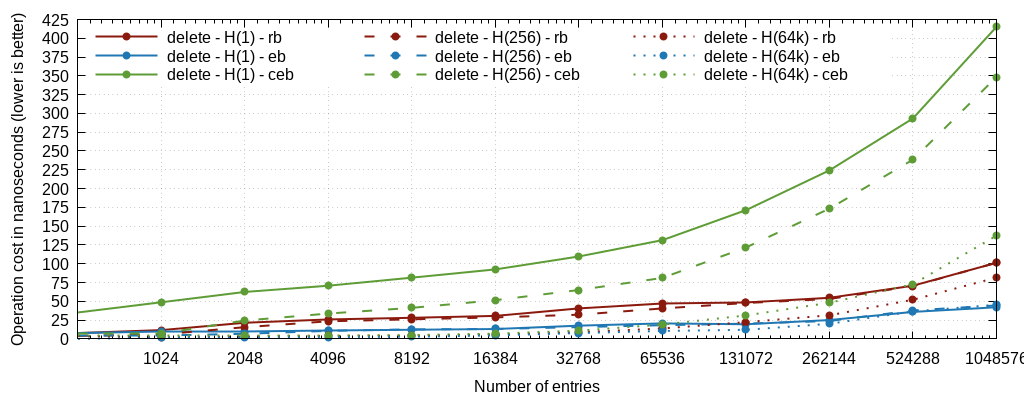
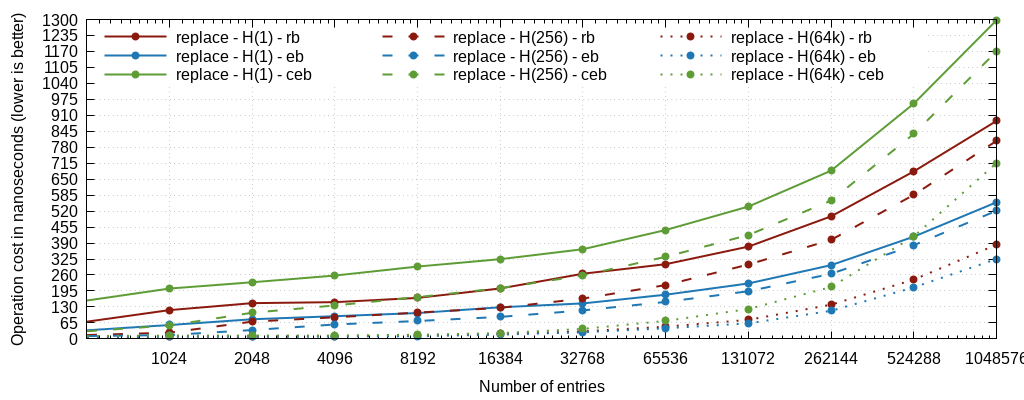
We're showing graphs for insert time, lookup time, deletion time, and what we call "replace", which is in fact the sum of the deletion and the insertion, which corresponds to a node recycling in a cache, or to the only operations that matter for timers (one insertion and one deletion).

The graphs are plotted with full lines for the single-head mode, dashed for the 256-head mode, and dotted for the 65536-head mode. Just click on the images to see the details.

1- Timers

insert lookup delete replace


Here we're essentially interested in the last "replace" graph. It perfectly illustrates something that we had observed in haproxy a long time ago (in version 1.2) when rbtrees were being used for the scheduler: the cost of rebalancing and the resulting imbalance are overkill for such regularly distributed keys. Here ebtrees are 3x faster, which is approximately in line with observations made by then when replacing them in haproxy. Some instrumentation was made on the tree traversal code to measure the number of levels, and it appears that in this specific case, ebtrees are shorter than rbtrees. Indeed, rbtrees try not to rebalance too often to amortize the cost, and end up guaranteeing that no branch will be more than twice as long as any other one, which means that it's possible to end up with 2*log(N) levels in the worst case. And for keys that are constantly renewed, this is exactly what happens. With ebtrees on the opposite, the good distribution ensures that the tree depth is also mostly equal between branches, and roughly matches log(N)+1..2 most of the time. It's interesting to note that except for the removal where cebtrees are much more expensive than the two others, cebtrees are as fast as ebtrees for insertion and as slow as rbtrees for lookups, and end up between the two for the whole pattern. This means that in cases where timers are not under heavy stress and rbtrees could be considered to save memory, then cebtrees would in fact be both smaller and faster for this type of keys and distribution. This could concern cache or certificate expiration for example where key size is more important than raw performance.

2- 64-bit hashes


Here on randomly distributed keys, we're observing the same phenomenon as in the previous test. It took a while to figure the cause but again it's the imbalance of rbtrees vs the better balance of ebtrees on such well distributed keys that make the difference. It's also visible that insertion is faster for cebtrees than ebtrees when the tree grows (256k keys and above), clearly due to the significantly higher memory footprint of ebtrees. It's interesting to note that single-headed ebtrees here are inserted as fast as 256-headed rbtrees and follow the curve all along. It's also visible that all trees insert much faster when hashed enough, since randomly distributed keys result in properly balanced sub-trees. It's visible that using 64k heads divides the insertion time by roughly 4 for all types.

For the lookups however, cebtrees are almost as slow as rbtrees. The reason seems to be related to the need to consult adjacent nodes all along the descent, resulting in reading 3 times more data before knowing where to go, which doesn't cope well with prefetching and branch prediction. and here the rbtree and cebtree curves are mostly fused all along the tests. Hashing does considerably help but doesn't benefit as much to cebtrees as it benefits to others: even at 256 heads, cebtree lookups become the slowest of the 3. And while at 256 heads, ebtrees are much faster than rbtrees, at 64k heads rbtrees win by a small margin. It is possible that a few imbalanced chains are longer in ebtrees than the roughly balanced ones in rbtrees in this case, as there should be on average 16 keys per tree a 1M entries. But once we consider the replacement cost (since such hashed keys typically have to be recycled in caches, tables etc), then the gain is well in favor of ebtrees which can still be 30% faster in total. Overall for such use cases, it looks like ebtree remains the best choice, and that cebtrees do not make much sense, unless space saving is the primary driver.

3- short strings

For short strings, ebtrees remain faster than rbtrees to insert and lookup, by roughly 30% for insertion and 20% for lookups. One reason might simply be that we don't need to re-compare the whole string, the comparison only restarts from the current level's position. However these are typical cases where it makes sense to hash the keys (unless they have to be delivered ordered, but session cookies do not have this problem for example). In this case we see that when hashing with sufficient heads (64k), then rbtree becomes twice as fast for lookups with a steep divergence around 256k entries, very likely because again, there might exist longer chains in the resulting small ebtrees than in the similarly sized rbtrees. In all cases, cebtrees follow ebtrees, except for removal where the O(logN) deletion time increases the cost.

The conclusion on this test would be that if ordering is required, then one must go with ebtree or cebtree, which show roughly equivalent performance except for deletion where cebtrees are not good. If ordering is not a concern and topmost speed is required and hashing over a large number of buckets is acceptable in order to end up with small trees, then better go with rbtrees that will have shorter long chains on average.

4- IPv4 addresses

IPv4 address storage and lookup is much more chaotic. Due to the anticipated poor address distribution, it's clearly visible that below 256k IPv4 per tree head, lookups via ebtree are significantly faster than rbtree, and that above, rbtree is significantly faster than ebtree. This clearly indicates the existence of long chains (up to 32 levels for IPv4). Also, insertion is always faster on ebtrees even when hashing at 64k. And if that wasn't complicated enough, cebtree is always faster both for insertions and lookups (but as usual, removal is way more expensive). However, this also means that it would likely be sufficient to apply a bijective (non-colliding) transformation like an avalanche hash to the stored keys to flatten everything and get a much nicer distribution, and get back to the same scenario as for 64-bit hashes above.

So what this means is that if IPv4 keys are needed (e.g. store per-client statistics), no single implementation is better over the whole range, and it would be better to first hash the key and use it like this, provided that the hashing algorithm is cheap enough. Given that XXH3 is used with good results for hashed heads, it's likely that XXH32 would be efficient here. But overall, indexing raw IPv4 addresses is suboptimal.

5- user agents

Here the first observation is that for large mostly-similar strings, one must not use cebtrees, which are twice slower than rbtrees, both for inserts and lookups. And ebtrees are not good either, being ~10% slower to insert and ~30% slower to look up. This is not surprising, because as anticipated, user-agents only differ by a few chars, and can be long, so there can be long chains of a single-char difference, implying many more levels in the prefix trees and in the balanced tree. However, here again, if sorting is not a requirement, it could make sense to hash the inputs using a fast non-colliding hash and index the hashes instead of the raw keys. Also, all operations made on cebtrees are significantly slower, again likely due to having to fetch adjacent keys, hence increasing the required memory bandwidth.

First conclusions

Prefix trees are much more sensitive to the input keys distribution, so it is not surprising to see ebtrees and cebtrees perform much less well when facing poorly distributed keys like client IP addresses or user agents. IPv6 addresses could behave worse, even letting the client choose to create 64-deep sub-trees for their own network. However, it's not like lists, because the slowest path is quickly reached and is bounded by the key size.

When high performance on large keys is desired, better use rbtrees, or split the trees using a hash if ordering is not a requirement. In this case it can even make sense to index the hashed key instead of the key itself in order to regain a good distribution as is observed in the 64-bit hashes tests.

Compact trees were initially expected to be way slower, while it's mostly the delete operation which is slower, but overall, they perform quite well, often better than rbtrees on small keys. They suffer from large keys due to the descent algorithm that requires to XOR the two next branches in order to figure where the split bit is located, hence consuming more memory bandwidth. For cases where removals are rare and keys are reasonably small, they can be very interesting. Tests on haproxy's pattern reference subsystem (map/acl indexing) even showed a boot speedup compared to existing code that uses ebtrees, and a significant memory saving. In general, using them to look up config-level elements seems to make sense. For more dynamic keys (session cookies etc), it may depend on the expected average lookup hit ratio. And they seem to have an interesting role to play in hash tables where they could replace lists and avoid the linear performance degradation that occurs when the load factor increases. This could be a drop-in replacement using the same storage model as the lists.

Rbtrees remain good overall (which was expected, there's a reason why they've been so widely adopted), and their performance doesn't really depend on the nature of the keys. This is also why, while they are much better on large keys, they cannot benefit from certain properties such as the timers or even well-distributed small keys.

It really looks like running a non-colliding hash on inputs and indexing only that could be very interesting with all trees. One must just make sure not to meet collisions. A 128-bit hash could be sufficient (though it would double the cebtree size). Another option would be to stay to 64-bit with a keyed hash, and change the key when a collision is encountered. It would be so rare that it might make sense, but could possibly not be compatible with all use cases. And some bijective algorithms exist that will not cause collisions on inputs of their native size (avalanche, CRC etc), allowing a great input mixing without introducing collisions.

Other trees like AVL could be evaluated. Their insertion/removal cost is higher as they will try hard to stay well balanced, but these could be the fastest performers for pure lookups.

Also here we've only spoken about indexing unique keys, but sometimes duplicate keys are needed (particularly for timers). The mechanism created for cebtrees would be portable to other trees by stealing one bit in the pointers. It would add to their complexity, but could theoretically work for rbtrees, making them suitable for more use cases. The could also be adapted to ebtrees to further speed up insertion of duplicates, which exists a lot in timers.

It's also visible that all trees degrade very quickly when the data set doesn't fit into the L3 cache anymore, and cebtree even more due to the need to check adjacent nodes. And there is a double problem: not fitting means more cache misses at each level, but not fitting also means a large tree hence more levels. This explains why the performance systematically degrades very fast with the tree size: we increment both the number of levels and the risk of a cache miss at each level, making the degradation grow faster than the tree size. This indicates that trees alone are not necessarily relevant on super-large datasets (e.g. database indexing). Again that's where combining them with fast hashes can make sense.